| Category
|
|
Networking
|
|
 Switches & Hubs |
|
ENGENIUS
|
| Buy Price GST Ex
|
Buy Price GST Inc
|
|
$670.91
|
$738.00
|
| Stock
|
GST Rate
|
|
Call
|
10%
|
| Description
|
EnGenius Neutron Series 8-Port GigE 130W PoE+ Wireless Management Controller & Switch with 8 GE PoE + 2 GE + 2 GE SFP, IEEE802.3at/af, 130w PoE power budget, internal power supply, 13 inch 1U rack-mountable
Manage Up To 50 Neutron Series APs
|
| Detailed Description
|

Neutron Series 8-Port GigE
130W PoE+ Wireless Management Controller & Switch
Manage Up To 50 Neutron
Series APs
EWS5912FP
- Scalable, simple to use, manage, and deploy
- A full-featured Layer 2 PoE+ Switch with Wireless Management
Capability
- Centrally manage & monitor up to 50 Neutron APs
- Wired and wireless network management supported
- IEEE 802.3at/af PoE on its 8 Gigabit Ports with a total PoE
budget of 130 Watts
- 2 Gigabit Port and 2 Dual-Speed SFP uplink ports
- Up to 24Gbps non-blocking switching capacity
|
|
A Feature-Rich Controller That Can
Deploy and Manage Up To 50 Neutron Series Access Points
Lets IT managers keep track of, map out,
and create clusters of Neutron Series Access Points in the
network. Gives network administrators the visibility to monitor,
manage and adjust settings in real time. Controller interface
displays usage reports for real time and historical client
connectivity to each Neutron Series Access Point as well as
traffic flow and load over both wired and wireless portions of
the network.
|
|
|
|
|
|
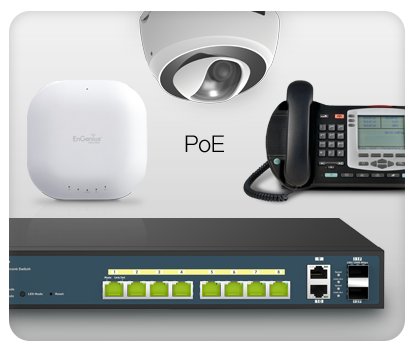
Power and Connect Access Points, IP
Cameras, VoIP Phone Systems and More!
Supports PoE+ IEEE 802.3at/af to deliver
power and connectivity to Access Points, Client Bridges, IP
Cameras, VoIP telephones and other PoE clients. Up to 30W per
port with a total PoE budget of 130W.
|
Gives Network Administrators the Power
to Manage PoE Usage on a Port-by-Port Basis
The Switch's User Interface allows IT
managers the ability to allocate just the amount of wattage they
need per port to power specific PoE client devices to conserve
as much of their Neutron Series Switch�s total PoE budget as
possible. Including more Neutron Series Switches to the network
gives administrators the ability and versatility to
substantially and rapidly scale their networks and to provide
just the right Neutron Series Switch necessary to provide
wireless connectivity or surveillance in a part of the network
previously unserved.
|
|
|
|
|
|
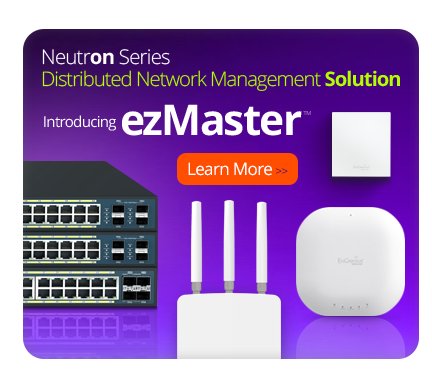
Unlimited Flexibility, Complete
Scalability with ezMaster�
Expanded central management features are
available for Neutron Switches and APs with ezMaster Network
Management Software. Manage 1,000+ APs and Switches and an
unlimited number of distributed networks across various cities,
regions or countries, regardless of size, all from a single
location. Neutron Switches provide future expandability for
broader device connectivity and redundant management between
Neutron APs and ezMaster with Smart Sync Redundancy (coming
2016).
|
Expand The Managed Wireless Network to
Other Buildings On Your Property
Includes two (2) Gigabit Uplink Ports, as
well as, two (2) Dual-Speed SFP ports to support transceivers
for fiber cabling for connectivity to offices, buildings, or
other parts of the network that exceed the distance capability
of regular Ethernet.
|
|
|
The EWS5912FP is a Neutron Series Managed
Wireless solution 8-Port Gigabit PoE+ Layer 2 Switch with 2 Gigabit
uplink ports and 2 Dual-Speed SFP ports for fiber uplinks. As part
of an EnGenius Neutron Series wireless management solution, the
EWS5912FP through its browser-based GUI (Graphical User Interface)
can discover, configure, manage and monitor up to 50 Neutron Series
Wireless Access Points. The Controller mode of the Switch provides a
suite of wireless management features for IT managers to configure
Neutron Series Access Points. Features include clustering Neutron
Series Access Points in clusters with identical policies, Access
Point IP Auto-Discovery, remote Access Point rebooting for
hard-to-reach / previously deployed units, and a host of visual
monitoring features including topology and floor plan view modes for
the mapping out and tracking of networks. The controller also
features a statistics section for record traffic tracking and
comparison between units or over-time comparisons.
Rack Mountable
The EWS5912FP includes bracketing hardware for mounting onto a
standard switch rack.
AP Auto IP-Assignment
Assign an IP address range for wireless clients connecting to
the network.
Full-Featured Layer 2
Manageability
Includes support for VLAN, QoS, IGMP/MLD Snooping,
STP/RSTP/MSTP, Link Aggregation Control Protocol (LACP), SNMP
v1/v2c/v3, and much more.
Technical Specifications
Standard
Switching
Capacity: 24Gbps
Forwarding Mode:
Store and Forward
SDRAM: 256MB
Flash Memory:
32MB
Port Functions
8 10/100/1000Mbps
Ports in the front panel
2 100/1000Mbps SFP
Slot?
2 Gigabit Uplink
Ports
1 RJ45 Console
Port
PoE Capability
PoE standard: Port
1~8 Support
IEEE 802.3at/af?
PoE Capable Ports: Port 1~8 can output up to 30W
Power budget: 130
watts
LED Indicators
Power LED x1
Fault LED x1
PoE Max LED x1
LAN Mode LED x1
PoE Mode LED x1
Copper
Ports:?LAN/PoE Mode, Link/Act?
SFP
Ports:?Link/Act
Environmental & Mechanical
Temperature
Range
Operating: 32 to
132�F / 0 to 50�C
Storage: -40 to
158�F / -40 to 70 �C
Humidity
(non-condensing): <5% - 95%
Wireless
Management Features (with Neutron Series Access Points)
Manages up to 50
Neutron Series APs
Access Point Auto
Discovery and Provisioning
Access Point Auto
IP Assignment
Access Point
Cluster Management
Remote Access
Point Rebooting
Access Point
Device Name Editing
Access Point Radio
Settings
Band Steering
Traffic Shaping
Fast Handover
Fast Roaming
Access Point
Client Limiting
Mesh Network*
Wireless Security
(WEP, WPA/WPA2 Enterprise, WPA/WPA2 PSK)
VLANs for Access
Point- Multiple SSIDs
Guest Network
Access Point
Status Monitoring
Wireless Client
Monitoring
Wireless Traffic &
Usage Statistics
Real-time
Throughput Monitoring
Visual Topology
View
Floor Plan View
Map View
Secure Control
Messaging
SSL Certificate
Local MAC Address
Database
Remote MAC Address
Database (RADIUS)
Unified
Configuration Import / Export
Bulk Firmware
Upgrade Capability
Intelligent
Diagnostics
* Mesh networking mode available soon as a
free firmware upgrade
L2 Features
802.3ad Link
Aggregation
Port Mirroring
Port Trunking
Spanning Tree
Protocol
- 802.1D Spanning
Tree (STP)
- 802.1w Rapid
Spanning Tree (RSTP)
- 802.1s Multiple
Spanning Tree (MSTP)
IGMP Snooping
v1/v2/v3
IGMP Fast Leave
VLAN Group
Voice VLAN
MLD Snooping
Queue
- CoS based on
802.1p priority
- CoS based on
physical port
- CoS based on TOS
- CoS based on
DSCP
802.1X Port-based
Access Control
802.1X Guest VLAN
Port security
Storm control
Port Isolation
Attack Prevention
Access Control
List (ACL)
PoE management
- Power on/off per
port
- Power class
configuration
- Power feeding
with priority
- User defined
power limit
SSH Server
Telnet Server
TFTP Client
BootP/DHCP Client
Web-based support
SNMP v1 support
SNMP v2c support
SNMP v3 support
TFTP upgrade
Command Line
Interface (CLI)
SNTP
RMONv1
SYSLOG
Cable Diagnostic
MIB Support
- RFC1213
- RFC1493
- RFC1757
- RFC2674
Environmental & Mechanical
Temperature
Range
Operating: 32 to
122�F / 0 to 50�C
Storage: -40 to
158�F / -40 to 70 �C
Humidity
(non-condensing)
<5% - 95%
Device
Dimensions and Weights
Weight: 4.4 lbs
Width: 13.00"
(330.20 mm)
Length: 9" (228.60
mm)
Height: 1.73"
(43.94 mm)
Warranty
1 year
Maximum data rates are based on IEEE 802.3ab
standards. Actual throughput and range may vary depending on
distance between devices or traffic and bandwidth load in the
network. Features and specifications subject to change without
notice. Trademarks and registered trademarks are the property of
their respective owners. For United States of America: Copyright
�2014 EnGenius Technologies, Inc. All rights reserved. Compliant
with FCC - This equipment has been tested and found to comply with
the limits for a Class A digital device, pursuant to Part 15 of the
FCC Rules. These limits are designed to provide reasonable
protection against harmful interference in a residential
installation. This equipment generates, uses, and can radiate radio
frequency energy and, if not installed and used in accordance with
the instructions, may cause harmful interference to radio
communications. Operation of this equipment in a residential area is
likely to cause harmful interference in which case the user will be
required to correct the interference at his/her own expense.
|
| Warranty Details
|
Warranty Period :
5
Years
|
|
|
 Award One Technology
Pty Ltd