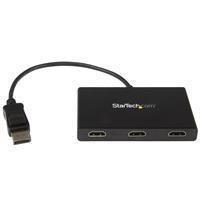
This MST hub lets you connect three HDMI�
monitors to your DisplayPort� (DP) 1.2 equipped Windows� laptop
or desktop.
Increase productivity with multiple
screens
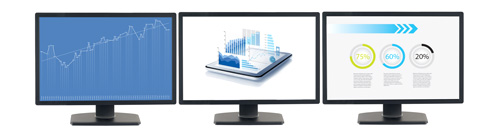
The newest generations of computers are
more portable than ever, which often means that you�re left with
fewer video outputs and smaller integrated screens. This MST
hub solves both of these problems by letting you connect three
additional displays to your computer, which makes multitasking
much easier.
Configure your displays for any
environment
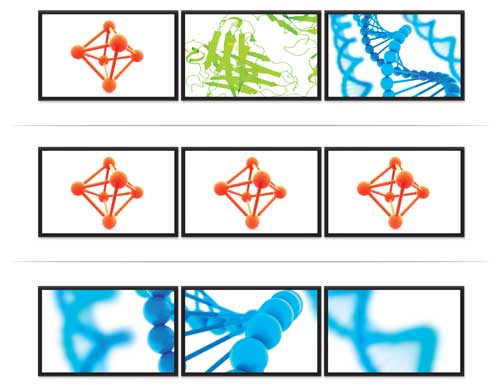
Using the MST hub, you can extend your
desktop onto additional monitors and stream independent content
to each display. You can also mirror the same image onto
multiple HDMI televisions or projectors for remote viewing
applications such as digital signage.
Enjoy amazing video quality without
draining system resources
MST technology uses your existing video
card to minimize the use of system resources while delivering
Ultra HD 4K resolutions. This unprecedented performance makes
MST perfect for high-resolution applications such as graphic
design, gaming and medical imaging.
Note: When using a DisplayPort 1.1
video card the MSTDP123HD will act as splitter, automatically
mirroring your video source across all displays. Resolution
limitations apply.
The MSTDP123HD supports plug-and-play
installation for a hassle-free setup, and is backed by a
StarTech.com 2-year warranty and free lifetime technical
support.
Note: MST shares 21.6 Gbps across all
attached displays. Higher resolutions can restrict the available
bandwidth with the remaining ports, please see our guideline
below for determining an ideal resolution for your
setup. Certain graphics adapters have limited MST support and
will only output to three displays in total. If more than three
monitors are attached the fourth will be disabled. Some monitors
limit available resolution
Average Resolution Bandwidth Allocation
1920x1080 (High-definition 1080p) @60hz - 22%
1920x1200 @60hz - 30%
2560x1440 @60hz - 35%
2560x1600 @60hz - 38%
3840 x 2160 (Ultra HD 4K) @30hz - 43%
Note: Exceeding 100% will reduce
functionality.
Examples of Supported Resolution
Configurations
Screen 1 Resolution
|
Screen 2 Resolution
|
Screen 3 Resolution
|
Total % of Bandwidth
|
| 1920x1200 @60hz (30%) |
1920x1200 @60hz (30%) |
1920x1200 @60hz (30%) |
90% |
| 2560x1440 @60hz (35%) |
2560x1440 @60hz (35%) |
1920x1200 @60hz (30%) |
92% |
| 2560x1600 @60hz (38%) |
2560x1600 @60hz (38%) |
1920x1080 @60hz (22%) |
98% |
| 3840x2160 @30hz (43%) |
1920x1200 @60hz (30%) |
1920x1080 @60hz (22%) |
95% |
| 3840x2160 @30hz (43%) |
3840x2160 @30hz (43%) |
None |
86% |
Examples of Unsupported Resolution
Configurations
Screen 1 Resolution
|
Screen 2 Resolution
|
Screen 3 Resolution
|
Total % of Bandwidth
|
| 2560x1600 @60hz (38%) |
2560x1600 @60hz (38%) |
1920x1200 @60hz (30%) |
106% |
| 3840x2160 @30hz (43%) |
2560x1600 @60hz (43%) |
1920x1200 @60hz (30%) |
116% |
| 3840x2160 @30hz (43%) |
2560x1600 @60hz (43%) |
2560x1440 @60hz (35%) |
121% |
| 3840x2160 @30hz (43%) |
3840x2160 @30hz (43%) |
3840x2160 @30hz (38%) |
124% |
 Award One Technology
Pty Ltd