|
Have you recently purchased a newer laptop or
Ultrabook and now you can�t figure out where to plug in your favorite
headset?
Most new laptops and Ultrabooks come equipped
with a single 3.5mm 4-position (4pin) audio port that supports both
audio input and output. A great number of headsets on the market come
equipped with two separate headphone and microphone connectors that are
not compatible with this new configuration.
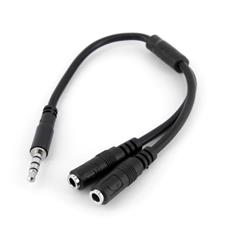
The MUYHSMFF headset adapter features two 3.5mm
3-position ports that provide a separate headphone and microphone
connection that can be connected to the single audio port on your
laptop. Alternatively, you can also connect a separate microphone and
powered speakers if you prefer to use Skype or chat online without using
a headset.
Headset Connectivity
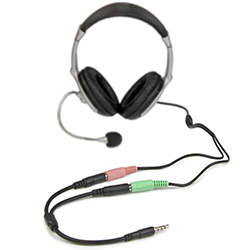
Simply connect the headphone plug from your
headset into the audio output port marked with the headphone symbol, and
connect the microphone plug into the audio input port marked with the
microphone symbol. Plug the adapter into audio port on your laptop and
you�re all set.
Microphone and Powered Speaker Connectivity
Want to work or game without using a headset?
You can also connect a microphone and powered
speakers to your laptop using the adapter. Just plug in your microphone
into the audio input port marked with the microphone symbol, and plug
your powered speakers into the audio output port marked with the
headphone symbol, and connect the adapter to the audio port on your
laptop.
Keep in touch while you travel
Are you travelling for work or taking a trip?
The headset adapter features a compact and sturdy
design that makes it the perfect solution for mobile applications.
Tuck the adapter in with your tablet or slip it
inside another carrying case. It works great with tablets and
smartphones that have a single audio port. Just connect the headphone
and microphone plugs from your headset into the adapter, connect the
adapter to your mobile device and start talking.
This high quality 3.5mm headset adapter is backed
by StarTech.com's lifetime warranty.
Please note:
This adapter is not a headphone splitter or
Y-cable. It cannot be used to split the audio output to two separate
sets of headphones or speakers.
Some laptops and mobile devices will not work
with all external microphones. This is typically caused by an impedance
mismatch between the microphone and the device. This is due to hardware
incompatibility and is not a limitation of the MUYHSMFF adapter.
|
Physical Characteristics |
| Product Weight |
9 g [0.3 oz] |
| Wire Gauge |
28 AWG |
|
Special Notes / Requirements |
| Note |
3.5 mm Mini-Jack (4
position) male is configured per CTIA Standard |
|
What's in the Box |
| Included in Package |
3.5mm 4 Pin to 2x 3 Pin
3.5mm Headset Splitter Adapter - M/F |
|
Physical Characteristics |
| Product Length |
200 mm [7.9 in] |
| Connector Style |
Straight |
| Color |
Black |
| Cable Length |
200 mm [7.9 in] |
|
Packaging Information |
| Shipping (Package) Weight |
0 kg [0 lb] |
| Package Quantity |
1 |
|
Hardware |
| Connector Plating |
Nickel |
| Cable Jacket Type |
PVC - Polyvinyl Chloride
|
|
Environmental |
| Storage Temperature |
-15�C to 75�C (-59�F to
167�F) |
| Humidity |
30~60% RH |
|
Connector(s) |
| Connector B |
3.5 mm Mini-Jack (3
Position) Female |
| Connector A |
3.5 mm Mini-Jack (4
Position) Male |
|
 Award One Technology
Pty Ltd