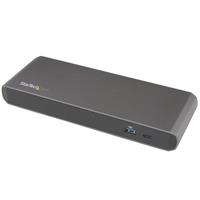
This cost-effective Thunderbolt� 3 dock (without full Power
Delivery) is designed for users with Thunderbolt 3 port equipped
MacBook Pro or Windows� based laptops who require port expansion,
but already have a way to charge their laptop. Plus, the dock
supports dual monitors, so you can easily connect two 4K Ultra HD
displays (one DisplayPort and one Thunderbolt 3 USB-C� port), or a
single Thunderbolt 3 display (60Hz). This docking station can
deliver up to 15W of power for slow charging any MacBook Pro, should
it be required.
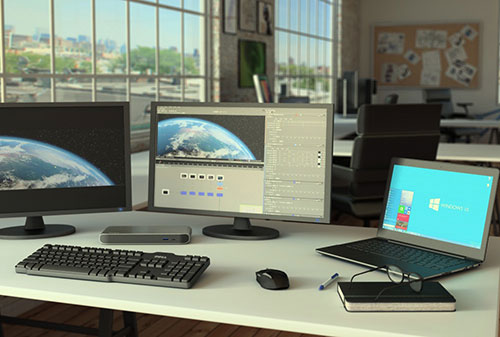
Merging performance with simplicity, this high-quality dock is a
single-cable solution that caters to creative professionals such as
video producers, graphic and web designers, engineers, architects,
and many more.
Finish your work faster with Thunderbolt 3
You can quickly integrate the dock into your workspace and boost
your productivity. With up to 40Gbps of throughput, you can add
extra displays to your laptop, access files faster, and reduce
waiting, so you can accomplish more in the same amount of time.
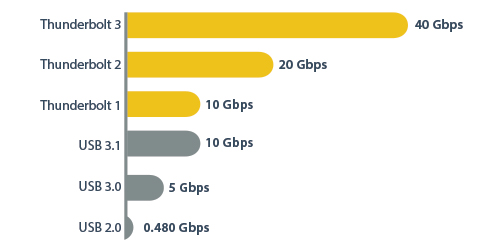
Thunderbolt 3 is the fastest connection available, and it
supports multiple video channels and data, without impacting system
performance. It�s easy to access and edit large uncompressed files
such as videos and images on the fly.
Multitask at the highest resolution
If you need a larger, higher-resolution viewing area, this dock
can help. You can connect two 4K Ultra HD displays, so it�s perfect
for anyone working with high-bandwidth or graphics-intensive
content.
The Thunderbolt 3 dock supports two 4K (3840 x 2160p or 4096 x
2160p) monitors through the DisplayPort and Thunderbolt 3 USB-C port
(a USB-C video adapter might be required). For dual monitors, simply
connect your DP monitor, and a second monitor through the dock�s
extra Thunderbolt 3 port using an adapter such as the
USB-C to DisplayPort Adapter Cable (CDP2DPMM1MB - sold
separately) or using a USB-C based monitor. The Thunderbolt dock
will also work with legacy displays, such as VGA monitors, when
coupled with a USB-C to VGA adapter or DP to VGA adapter.
With support for two 4K monitors, the Thunderbolt dock makes it
easier to multitask when you�re working with high-definition video
or other complex work.
Connect your peripherals using only a single cable
Using the single Thunderbolt 3 cable (included) and a single port
on your laptop, you can transform your macOS Sierra (or later) or
Windows� 7 (or later) laptop into a full-size workstation with
access to new and legacy technologies through a number of different
port types. The dock is ideal for virtually all Thunderbolt 3
equipped laptops, including the Apple MacBook Pro (2016) and the
Dell� XPS 13.
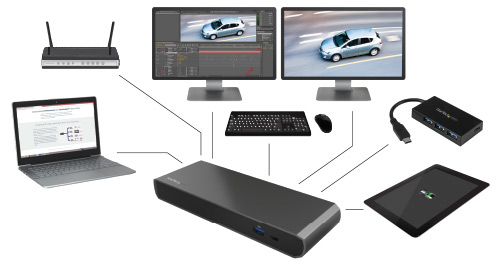
The Thunderbolt 3 docking station features two Thunderbolt 3
USB-C ports for connecting to Thunderbolt devices and other
peripherals that use the USB-C connector, as well as DisplayPort
video output.
Convenient connections prepare you for the future
You can keep your mobile device charged and ready to go using the
dock�s convenient, always-on USB fast-charge and sync port which
supports USB Battery Charging Specification 1.2. The Thunderbolt 3
dock offers a variety of other connections that are often missing
from port-limited laptops, such as an extra USB-C port (5Gbps - data
only), and a Gigabit Ethernet port.
With three USB 3.0 ports in total, you have plenty of ports to
connect modern and legacy devices. (USB 3.0 is also known as USB 3.1
Gen 1.) Now, you can rest assured knowing you�re ready for the
current and next generation of universal connectivity.
The rear-panel DP and USB-C ports can be used with dual monitors
that support lower resolutions, such as 4K at 30Hz or 1080p.
StarTech.com offers a variety of USB-C video adapters, such as
USB-C to HDMI and
USB-C to VGA, which lets you connect a mixture of modern and
legacy displays to the docking station.
Maximum Supported Resolutions*
Video Output Configuration
|
Max DisplayPort Resolution
|
Max Thunderbolt 3 USB-C
Resolution
|
|
DisplayPort and Thunderbolt 3 USB-C
(Two Displays -
Dual-4K )
|
3840 x 2160p or 4096 x 2160p
(4K)
|
3840x 2160p or 4096 x 2160p
(4K)
|
|
DisplayPort
(Single Display - 4K)
|
3840 x 2160p or 4096 x 2160p
(4K)
|
N/A
|
Thunderbolt 3 USB-C
(Single Display through DP ALT mode - 4K) |
N/A |
3840x 2160p or 4096 x 2160p
(4K - 60Hz) |
|
Thunderbolt 3 USB-C Daisy Chain
|
N/A
|
Dependent on the number of
Thunderbolt 3 displays
|
|
*Lower resolutions are also supported.
*When connecting a display to one of the
Thunderbolt 3 USB-C ports, a USB-C video adapter may be
required depending on the input of your display.
|
Certain monitors may be limited to 4K at 30Hz when connecting
through DisplayPort. These monitors include the following models:
Dell P2715Q, Viewsonic VX2475Smhl-4K, Philips 288P6LJEB, LG
31MU97C-B, Asus PB287Q (these models will need to be set to 4K at
30Hz).
The TB3DKDPMAW features a rugged aluminum casing, and is backed
by a StarTech.com 3-year warranty and free lifetime technical
support.

Your computer�s Thunderbolt 3 ports might not function
properly until you update one or more of the following on your
computer:
� BIOS
� Thunderbolt firmware
� Thunderbolt 3 controller drivers
� Thunderbolt 3 software
The required updates will vary depending on your computer.
For an up-to-date list of affected computers and
instructions, visit http://thunderbolttechnology.net/updates. If
your computer's manufacturer isn�t listed on the Thunderbolt
website, contact your manufacturer.
 Award One Technology
Pty Ltd